

Friday, August 19, 2011
How to Take a Screenshot in Apple iPad

Wednesday, July 27, 2011
How to Protect Your Computer and Internet Connection
In the age of the Internet, protecting your computer requires more offensive behaviour to ensure that your information is safe. Internet users must protect their computer from viruses, spyware, random crashes and numerous other occurrences. There are some safety measures that all computer owners should take to ensure their computer’s safety.


Protect against Viruses
Most people have invested in a virus scanner for their computer. Some scanners require a nominal fee and others are free. High Speed Internet often offer a free download or access to a virus scanner to protect the computer from Trojans, worms or other infections on the computer.
For the software to work, users must update the software as often as the company sends updates. As new viruses are discovered, the software company will send updates to block new viruses. Obtain virus blocking software to protect from programs that will delete files or make your computer run slowly.
Try Spyware Protection
Spyware is a malicious piece of code that will record every website visited, passwords and key strokes on the computer. People that plant spyware on your computer may use the information to engage in criminal activity or to block your interaction with other people. In some instances, the information is sold to companies for marketing purposes or to give criminals access to your online bank account. This invasion of privacy may cause the computer to run slowly.
Always Use a Firewall
Firewall use is important when using a computer in public places. This may also be important when using the wireless Internet at home. The firewall may act like a wall between your computer and other computers on the same Internet connection. The firewall will prevent any unwanted information transfer from one computer to the next.
Firewalls protect our information from hackers. If you use wireless Internet in public locations, you will often see that the firewall is disabled. If this happens, enable the firewall for it to be effective. If the Internet will not work with the firewall being enabled, then either use with caution or recognize that the business may be lifting your information for their selfish gain.
Some operating systems, such as Windows XP, have their own built-in firewall. Free firewall software is also available on the Internet. Try websites, such as http://www.zonelabs.com or http://smb.sygate.com/, for free access to firewall software.
I Have All Three, Am I Safe Now?
The short answer is, “No.” Anti-virus protection, spyware protection and firewall software will only protect against known viruses and spyware. If the hacker is smart enough to develop a virus, Trojan or worm that will infiltrate the current system, then he or she may be able to penetrate the current code and compromise your computer. Users should remain vigilant with updates to prevent attacks.
Users may take preventative actions to avoid being preyed upon by hackers. For instance, do not open any attachments from any sources that are not trusted or known by you personally. A hacker could activate a Trojan to lift information from your computer if he or she convinces you, the recipient, to activate the code through a link, download or button.
The actual download may be transparent to the user, until the computer begins to run slowly. Then, the user may suspect that someone has compromised their information and seek help. Hopefully, the damage will be repairable.
Often, the source of the attacks is not traceable, because the hacker is smart enough to route the attack through numerous servers before actually arriving at the intended source. Hackers, therefore, are difficult to prosecute. Remain vigilant to avoid hackers.
Saturday, July 16, 2011
Runner maps 21km Google+ logo on the streets of Tokyo
Google+ has received pretty warm reviews from its early band of users, but one fan in particular has taken his appreciation of the social networking platform to a whole new level.
British-born Tokyo resident Joseph Tame has run a half-marathon along a route that he mapped out to resemble the Google+ logo:

Using a combination of RunKeeper to track the run on one iPhone and Google Earth on a second iPhone to see which way to go next, Tame ran over 21km around the streets of Tokyo. Tame said:
“Planning the route with Google Maps beforehand took about 90 minutes – it was tricky to get everything in proportion given the road layout. Unfortunately I accidentally picked up an iPhone 3G instead of a 3GS (for his second iPhone) – it was sooooo slow, and in fact in the end the GPS packed up altogether (possibly due to the fact that it was connected to a mobile router that has a habit of getting its coordinates in a twist).”
It seems that Joseph Tame has a history of merging his love of running with his addiction to gadgetry. In February he completed the Tokyo Marathon with four iPhones, an iPad, Android phone and a heart rate monitor strapped to him, and streamed it all live on the Web.
Microsoft comes up with a new social site?
It seems to me like Microsoft is planning for a launch of new social networking site in partnership with Facebook and Twitter. Here is the first glimpse of the socl.com homepage that got revealed by mistake. The site was originally owned and operated by Microsoft.

But once it was out in news, Microsoft immediately hid the page saying "Socl.com is just an internal design project from a team in Microsoft Research which was mistakenly published to the web and they did not mean to create it honestly."
So what your take on this? Do you really think socl.com is just an internal design project or is Microsoft really planning to start a new social networking site?
So what your take on this? Do you really think socl.com is just an internal design project or is Microsoft really planning to start a new social networking site?
Credits:Pяυ∂ђ√ι
Tuesday, June 28, 2011
Chat With Your Friends In Command Prompt - A simple Hack
1. All you need is your friends IP address and your Command Prompt.
2. Open yournotepad and write tis code as it is……………… I would prefer you to copy this !
@echo off:
A
Cls
echo MESSENGER
set /p n=User:
set /p m=Message :
net send %n% %m%
Pause
Goto A3.
Now save this as "Messenger.Bat”
.
4. Drag this file (.bat file)over to Command Prompt and press enter!
5. You would then see some thing like this:
MESSENGER
User:
6. After "User” type the IP address of the computer you want to contact.
7. Before you press "Enter” it should look like this:
MESSENGER
User: IP_Address User: IP_Address
Message: Hi, How are you ? Message: Hi, How are you?
8. Now all you need to do is press "Enter”, and start chatting
2. Open your
@echo off:
A
Cls
echo MESSENGER
set /p n=User:
set /p m=
net send %n% %m%
Pause
Goto A3.
Now save this as "Messenger.Bat”
.
4. Drag this file (.bat file)over to Command Prompt and press enter!
5. You would then see some thing like this:
MESSENGER
User:
6. After "User” type the IP address of the computer you want to contact.
7. Before you press "Enter” it should look like this:
MESSENGER
User: IP_Address User: IP_Address
Message: Hi, How are you ? Message: Hi, How are you?
8. Now all you need to do is press "Enter”, and start chatting
Sunday, June 26, 2011
Facebook Shortcuts Keys
Have you ever heard of Facebook shortcuts? Of course, you might have heard of the ones which you use to update your status on Facebook but there are a few more shortcuts which you must know being a Facebook User. These shortcuts help you navigate through the social network easily. Here are the shortcuts for Facebook for various Browsers
Chrome:
- Alt+1: View your News Feed
- Alt+2: View your own Profile
- Alt+3: View pop-up of friend requests
- Alt+4: View pop-up of messages
- Alt+5: View pop-up of notifications
- Alt+6: View Account Settings
- Alt+7: View Privacy Settings
- Alt+8: View Facebook’s own profile
- Alt+9: Read latest Terms of Service agreement.
FireFox:
- Shift+Alt+1: View your News Feed
- Shift+Alt+2: View your own Profile
- Shift+Alt+3: View pop-up of friend requests
- Shift+Alt+4: View pop-up of messages
- Shift+Alt+5: View pop-up of notifications
- Shift+Alt+6: View Account Settings
- Shift+Alt+7: View Privacy Settings
- Shift+Alt+8: View Facebook’s own profile
- Shift+Alt+9: Read latest Terms of Service agreement.
- Shift+Alt+0: Open Facebook Help Center
Thursday, June 16, 2011
How To Search An Image With Google Images
Now you can search any related images for the images you upload on Google. This Service was Offered by many websites before but obliviously if Google has entered into this stream then it will beat all the other competitors.
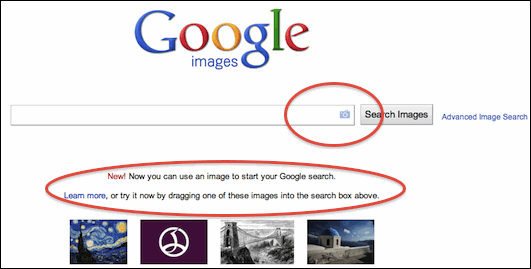
1. Entering image in 3 Ways .: you can
2. Image Defining Capability .: If Google recognizes your image it will automatically define that image through its small option called “Best guess”. its really helpful because it will automatically tell you the short name for that imagewhich will help you to refine your search.

Sunday, June 12, 2011
How To Download Torrents Files On Mobile
Torrents as you all know is the popular way fordownloading any latest music , movies, games and other stuff instantly you just go to the website search anddownload and the best thing is that all these things youdownload are free so today we will how too downloadtorrents on mobile which will help you to easily access your music, movies, games and other stuff on the go.
Follow the below steps to download torrents on mobile .:
1. First go to your best torrent website on mobile and search for the file you are about to download.
2. Than go to Torrific.com on mobile open this in new tab
3. You have to login in order to download torrents directly so you can simply login if you have account else create one its for free.
4. After succefull login in just paste the torrent link you copied from your torrent website well it should have .torrent @ the end.
5. Now click GET and than on the next page click INITIATE BITTORRENT TRANSMISSION.
6. Now it will give a direct link to all your torrent files but if it says it will some time don’t worry just close the website and relax as soon as your file is ready fordownload they will mail you the link, just click on that link and download files easily.
Friday, June 3, 2011
The $250 Case That Turns Your iPad into a Laptop (Almost)
This new case gets your iPad as close to a laptop as you can hope for--but you'll also be paying laptop-like prices.
There are several iPad keyboard accessories that add more functionality to the tablet, but none have been really able to turn it into a laptop--until now. The Crux Loaded clamshell case, which will be available in the fall, adds a keyboard, trackpad, and an external battery into the base for a laptop-like experience. Considering the $249 price and the cost of the iPad to begin with, you're also paying laptop-like prices.
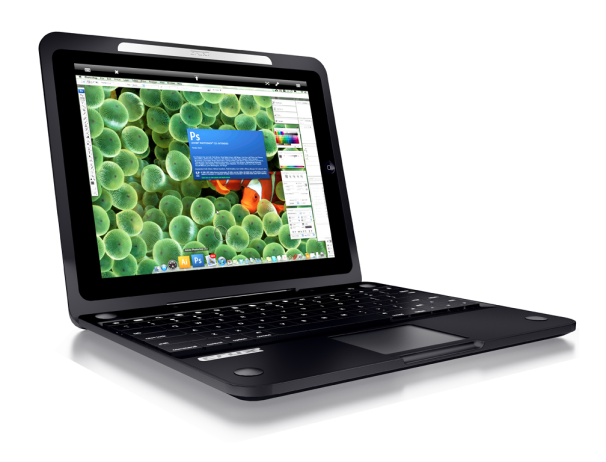
The Crux product website says this case is the first iPad case to feature a remote-Bluetooth trackpad and additional external battery. The extra battery should give you 7.5 more hours of usage.
With the remote trackpad, you may also be able to control your computer using the iPad--view your computer's desktop and use any of its programs remotely. Bringing your home desktop (or a real laptop) to your iPad screen could make your iPad much more functional. You'll need a $30 remote desktop app to do that, however.
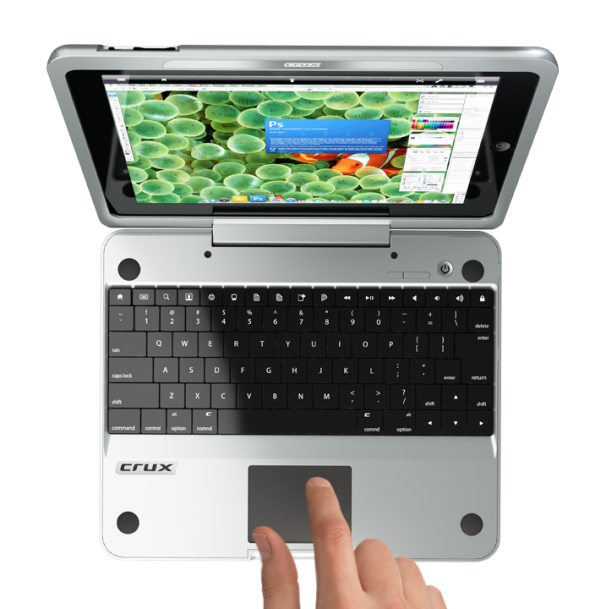
Other wireless keyboard cases for the iPad, such as the ZAGG Zaggmate, cost around $100--so for an additional $150 you're getting more battery life and the trackpad (which you probably don't need for iPad use alone--it does have a touchscreen). Tack on another $30 and you've got your own expensive iPad-laptop transformer.
Thursday, June 2, 2011
Cheap I Phone to launch in 6-18 Months Analyst
Apple will enter the mid-range phone market in the next year and a half, a market analyst predicts, as it looks to head off the challenge from keenly priced Android smartphones.
According to Peter Misek of Jeffries, checks his company have conducted “increasingly point to a launch [of a low-cost iPhone] within the next 6-18 months”.
Misek claims that the handset, which tech types have provisionally dubbed the iPhone Nano, could sell for as little as $300 (not much shy of £200 ) while still allowing Apple to maintain a respectable profit margin.

Rumours that Apple would shed its ‘premium product at a premium price’ policy in favour of a more inclusive, mass market approach to smartphones have been rife for years.
However, they have gained fresh momentum in recent months, as Android has usurped Apple’s iOS operating system as the world’s largest smartphone platform as measured by shipments in the last quarter.
The unofficial ‘Nano’ sobriquet stems principally from the fact that the cheaper phone is expected to be a more compact bit of kit than earlier iPhone iterations. To keep costs down, Apple is rumoured to be planning to recycle components from earlier iPhones.
According to Peter Misek of Jeffries, checks his company have conducted “increasingly point to a launch [of a low-cost iPhone] within the next 6-18 months”.
Misek claims that the handset, which tech types have provisionally dubbed the iPhone Nano, could sell for as little as $300 (not much shy of £200 ) while still allowing Apple to maintain a respectable profit margin.
Rumours that Apple would shed its ‘premium product at a premium price’ policy in favour of a more inclusive, mass market approach to smartphones have been rife for years.
However, they have gained fresh momentum in recent months, as Android has usurped Apple’s iOS operating system as the world’s largest smartphone platform as measured by shipments in the last quarter.
The unofficial ‘Nano’ sobriquet stems principally from the fact that the cheaper phone is expected to be a more compact bit of kit than earlier iPhone iterations. To keep costs down, Apple is rumoured to be planning to recycle components from earlier iPhones.
Nokia Launches X1-00 Cheapest Music Phone
Nokia launched X1-00 which is not only cheap but also packed with lots of features. This phone is mainly for music lovers and entry-level customers. The phone also has large and powerful loudspeaker to listen music without headset with frequency tweaked so that it remains undistorted at higher volumes.


Features of Nokia X1-00
- 1.8 inch, 128 x 160 pixel 65k Color TFT Display
- Weighs 91g and 16mm thick.
- Numeric Keypad , NaviKey with Three Dedicated Music Keys
- Symbian S30 OS
- FM Radio, 3.5mm audio jack
- Shuffle feature for song mix up and One Key Playlist creator
- Up to five phone books with 500 entries for different users.
- MicroSD expansion slot with up to 16GB support.
- Speaking alarm clock, Calculator, Torch, 5 pre-installed games.
- 1320 mAh battery with 13.1 h talk time and 61 days standby and 38 h music playback.
iPhone 5 Concept
iPhone 5 is started thinking the people day by day for some reason of iPhone 4.In this post i’m presenting a couple of iPhone 5 designs.
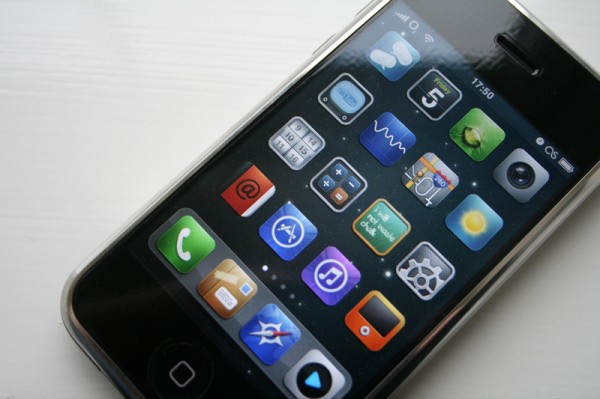
The first one shows the next-gen iPhone 5 as a very thin device, a lot thinner than the current iPod touch 4G.Apple will probably take more than a years to launch such a device.When it will launch it will be magical to everybody.
The second iPhone
5 design shows an iPhone 4-like design and the outer antenna is still there. What’s interesting about it are the apps, which are totally new, and they’d definitely convince you to buy the phone. And here’s what regular apps will be able to do on this iPhone 5, as there will be an app that:
* Attracts UFOs
* Ex-foliation
* Spins straw into gold
* Enables time travel
* Makes you invisible
* Pie on demand
* Get out of jail free
* Predicts future, changes past
* Controls weather & stock market
* Makes broccoli taste like chocolate
* Masseuse
* Gives flu to your ex
* Cures flu
* Repairs appliances
* Cosmetic surgery
* Cleans teeth
* Does your taxes & your hair
* 3D video camera
* Plays 3D movies
* Washes your cat
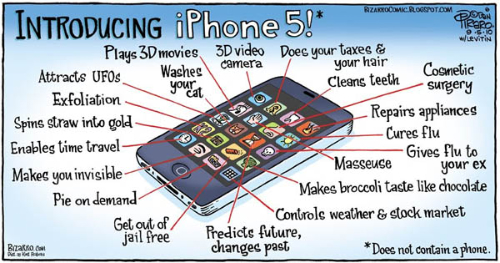
So, there’s an app for everything in the iPhone 5.It’s now time for wait and wait.
Thanks
The first one shows the next-gen iPhone 5 as a very thin device, a lot thinner than the current iPod touch 4G.Apple will probably take more than a years to launch such a device.When it will launch it will be magical to everybody.
The second iPhone
5 design shows an iPhone 4-like design and the outer antenna is still there. What’s interesting about it are the apps, which are totally new, and they’d definitely convince you to buy the phone. And here’s what regular apps will be able to do on this iPhone 5, as there will be an app that:
* Attracts UFOs
* Ex-foliation
* Spins straw into gold
* Enables time travel
* Makes you invisible
* Pie on demand
* Get out of jail free
* Predicts future, changes past
* Controls weather & stock market
* Makes broccoli taste like chocolate
* Masseuse
* Gives flu to your ex
* Cures flu
* Repairs appliances
* Cosmetic surgery
* Cleans teeth
* Does your taxes & your hair
* 3D video camera
* Plays 3D movies
* Washes your cat
So, there’s an app for everything in the iPhone 5.It’s now time for wait and wait.
Thanks
Subscribe to:
Posts (Atom)