Thursday, June 16, 2011

How To Search An Image With Google Images

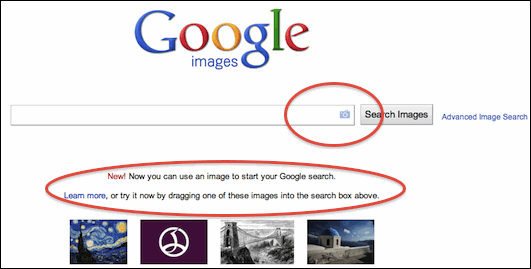
Now you can search any related images for the images you upload on Google. This Service was Offered by many websites before but obliviously if Google has entered into this stream then it will beat all the other competitors.

Search Through Images With Google Images

1. Entering image in 3 Ways .: you can upload image in 3 ways for attempting a search. The first way is by clicking the Camera icon you can see in the above image. The second way is by simply uploading. The Third and easiest way is by simply dragging the image onto this page and it will search related contents for that image.

2. Image Defining Capability .: If Google recognizes your image it will automatically define that image through its small option called “Best guess”. its really helpful because it will automatically tell you the short name for that imagewhich will help you to refine your search.

3. Getting refined Results .: Google has a vast database hence your image will be refined till it suits you and fits perfect for your project.

So that’s a new feature from Google the Image Search through image.

Source : freenuts

Sunday, June 12, 2011

How To Download Torrents Files On Mobile

Torrents as you all know is the popular way fordownloading any latest music, movies, games and other stuff instantly you just go to the website search anddownload and the best thing is that all these things youdownload are free so today we will how too downloadtorrents on mobile which will help you to easily access your music, movies, games and other stuff on the go.UTorrent

Follow the below steps to download torrents on mobile .:

1. First go to your best torrent website on mobile and search for the file you are about to download.

2. Than go to Torrific.com on mobile open this in new tab

3. You have to login in order to download torrents directly so you can simply login if you have account else create one its for free.

4. After succefull login in just paste the torrent link you copied from your torrent website well it should have .torrent @ the end.

5. Now click GET and than on the next page click INITIATE BITTORRENT TRANSMISSION.

6. Now it will give a direct link to all your torrent files but if it says it will some time don’t worry just close the website and relax as soon as your file is ready fordownload they will mail you the link, just click on that link and download files easily.

Friday, June 3, 2011

The $250 Case That Turns Your iPad into a Laptop (Almost)

This new case gets your iPad as close to a laptop as you can hope for--but you'll also be paying laptop-like prices.


There are several iPad keyboard accessories that add more functionality to the tablet, but none have been really able to turn it into a laptop--until now. The Crux Loaded clamshell case, which will be available in the fall, adds a keyboard, trackpad, and an external battery into the base for a laptop-like experience. Considering the $249 price and the cost of the iPad to begin with, you're also paying laptop-like prices.

The Crux product website says this case is the first iPad case to feature a remote-Bluetooth trackpad and additional external battery. The extra battery should give you 7.5 more hours of usage.

With the remote trackpad, you may also be able to control your computer using the iPad--view your computer's desktop and use any of its programs remotely. Bringing your home desktop (or a real laptop) to your iPad screen could make your iPad much more functional. You'll need a $30 remote desktop app to do that, however.

Other wireless keyboard cases for the iPad, such as the ZAGG Zaggmate, cost around $100--so for an additional $150 you're getting more battery life and the trackpad (which you probably don't need for iPad use alone--it does have a touchscreen). Tack on another $30 and you've got your own expensive iPad-laptop transformer.

Thursday, June 2, 2011

Cheap I Phone to launch in 6-18 Months Analyst

Apple will enter the mid-range phone market in the next year and a half, a market analyst predicts, as it looks to head off the challenge from keenly priced Android smartphones.
According to Peter Misek of Jeffries, checks his company have conducted “increasingly point to a launch [of a low-cost iPhone] within the next 6-18 months”.
Misek claims that the handset, which tech types have provisionally dubbed the iPhone Nano, could sell for as little as $300 (not much shy of £200 ) while still allowing Apple to maintain a respectable profit margin.
iphone nano 2
Rumours that Apple would shed its ‘premium product at a premium price’ policy in favour of a more inclusive, mass market approach to smartphones have been rife for years.
However, they have gained fresh momentum in recent months, as Android has usurped Apple’s iOS operating system as the world’s largest smartphone platform as measured by shipments in the last quarter.
The unofficial ‘Nano’ sobriquet stems principally from the fact that the cheaper phone is expected to be a more compact bit of kit than earlier iPhone iterations. To keep costs down, Apple is rumoured to be planning to recycle components from earlier iPhones.

Nokia Launches X1-00 Cheapest Music Phone

Nokia launched X1-00 which is not only cheap but also packed with lots of features. This phone is mainly for music lovers and entry-level customers. The phone also has large and powerful loudspeaker to listen music without headset with frequency tweaked so that it remains undistorted at higher volumes.
Nokia-X1-00

Features of Nokia X1-00

  • 1.8 inch, 128 x 160 pixel 65k Color TFT Display
  • Weighs 91g and 16mm thick.
  • Numeric Keypad , NaviKey with Three Dedicated Music Keys
  • Symbian S30 OS
  • FM Radio, 3.5mm audio jack
  • Shuffle feature for song mix up and One Key Playlist creator
  • Up to five phone books with 500 entries for different users.
  • MicroSD expansion slot with up to 16GB support.
  • Speaking alarm clock, Calculator, Torch, 5 pre-installed games.
  • 1320 mAh battery with 13.1 h talk time and 61 days standby and 38 h music playback.
This is great entry-level music phone that offers lots of features like great loudspeaker, FM Radio and excellent battery life. This is price 35 Euros which is about Rs 2,200. This phone will be available in Orange and Ocean blue colors and will launch the next month in selected countries.

iPhone 5 Concept

iPhone 5 is started thinking the people day by day for some reason of iPhone 4.In this post i’m presenting a couple of iPhone 5 designs.


The first one shows the next-gen iPhone 5 as a very thin device, a lot thinner than the current iPod touch 4G.Apple will probably take more than a years to launch such a device.When it will launch it will be magical to everybody.
The second iPhone
5 design shows an iPhone 4-like design and the outer antenna is still there. What’s interesting about it are the apps, which are totally new, and they’d definitely convince you to buy the phone. And here’s what regular apps will be able to do on this iPhone 5, as there will be an app that:
* Attracts UFOs
* Ex-foliation
* Spins straw into gold
* Enables time travel
* Makes you invisible
* Pie on demand
* Get out of jail free
* Predicts future, changes past
* Controls weather & stock market
* Makes broccoli taste like chocolate
* Masseuse
* Gives flu to your ex
* Cures flu
* Repairs appliances
* Cosmetic surgery
* Cleans teeth
* Does your taxes & your hair
* 3D video camera
* Plays 3D movies
* Washes your cat

So, there’s an app for everything in the iPhone 5.It’s now time for wait and wait.
Thanks

Monday, May 30, 2011

Intel Making Virus Killing Chip?

The news of Intel’s very expensive McAfee purchase raises one obvious question: why is security software worth over $7 billion to a chip maker? Intel has been short on specifics, but it’s becoming clear that virus-killing silicon is coming.

Computer security with hardware roots isn’t new for Intel, but it’s stuck in last-gen tech that can’t stop your system from getting smoked. Feature sets that can help filter out malicious network traffic or let CPUs screen for certain worms have been safeguarding computers you’ve already thrown away by now. But they’re limited. Right now, most of the anti-malware grunt work is being handled by software. Letting applications do the heavy lifting is a resource-heavy affair, which makes chipmakers like Intel nervous when they look forward and see the future of computing floating in the cloud.

The problem with security in the cloud is twofold. To begin with, netbooks and tablets usually just don’t have the muscle to balance intensive malware efforts. Do you think your anemic netbook can root out marauding trojans, scanning hundreds of thousands of files, as well as your desktop? But what about just putting the security software in the cloud too? This leads to a second objection: do we really want our sensitive stuff floating out of our devices? Will people feel comfortable having their secrets scanned remotely? Intel doesn’t think so—and says it has a solution.

Virus-Busting Chips! Why Intel Paid Billions for McAfee.

When we interviewed Intel’s head tech honcho, CTO Justin Rattner in June, he had much to say about the intersection of cloud computing and secure computing. And the future of beating viruses, according to Intel, lies in the chips that drive our devices, not some program running in the background. “As silicon developers,” Rattner explained, “we have a requirement to provide truly secure capability when it’s needed.” This means malware-fighting hardware is a new mandate. Rattner asserts that their hardware ambitions are to “protect those systems from the various forms of malware and then, in addition, giving them the ability to keep their secrets no matter what happens.” Which sounds a little abstract, right? But put it in context: Rattner’s plan sounds pretty real as of right now.

While discussing the news of their acquisition today, Intel minced no words about where their pricey new subsidiary will take them. McAfee technology will be put on Intel silicon. Virus scanning, trojan hunting, buffer overflow-blocking—all beat back before it has a chance to touch your software. McAfee’s line of applications will continue to sell as is, but Intel simply doesn’t believe that the future of computer security can be done with software alone. Malware keeps getting meaner. To block viruses, you need to hit them as soon as possible, which means as deep into the hardware as possible. Think of it as the difference between swatting flies in your kitchen and just keeping your windows closed in the first place.

Intel’s processors won’t change for now, but when we asked them about the deal’s implications for architecture changes down the line, they confirmed that the era of an antivirus-on-a-chip lies ahead—with a mysterious new hardware product slated for 2011. Thanks to Moore’s Law, Intel will have more real estate to fill with security mechanisms—courtesy of McAfee’s R&D labs. Whether secure silicon takes the form of hardware acceleration for virus-sniffing heuristics, or something else entirely, remains to be seen. But if Intel makes good on its promises (and on the nearly $8 billion it forked over), that folder of photos you regret will stay safe without having to climb to the cloud.

Sunday, May 29, 2011

Get Kaspersky Internet Security 3 Month Key

Hello everyone.
Kaspersky Russia is providing a free 3-Month license for Kaspersky Internet Security 2011 for 2 PCs.
Nice way of promoting ;)
I'll show you how to get it.

Things you require:
- Kaspersky Internet Security 2011 [Obviously]
- A Facebook account
- An email id where your key will be sent.

Steps:
- Log in to your facebook account.
- Go to the Kaspersky Lab Russia fan page.
- Click like on the fan page:


- Now choose "Free Trial" from the left menu (below photos) and click the Green button when its loads completely:


- Allow the application to access your basic information:


- After accepting, it will come back to same page and your promotional code will be there. Copy the code somewhere:


- Now goto the Kaspersky Promo Activation Page and enter your details (see pic for reference):


- After clicking the button (4) you will see this page if everything goes correctly:


- You've done it! Now goto your mail (which you wrote in above) and you should see your activation key for 3 months. :)


- Now enter you key is KIS and you have a fully activated KIS 2011 for 3 Months. Congrats! :)

Credits: flAmingw0rm

Tuesday, May 24, 2011

How To Find Local Weather Reports In Gtalk Using Google Talk Guru


Finding Local Weather Reports of your city, town etc is made simple and faster with the help ofGoogle Guru talk. Even a small kid can easily knows the gtalk so using the Gtalk technology to know the local weather reports. So Google comes with bots which gives the information immediately within seconds its a automatic process with best results. so lets see how to find the local weather reports using google talk guru.

Tutorial

  1. Logon to your gtalk account.
  2. Then give chat invitation to this id guru@googlelabs.com
  3. After Sending the chat invitation to the google talk guru i.e. guru@googlelabs.com. You can see a friend name “Guru” in your chat list .
  4. weather reports

  5. After Adding the id then click on “chat ” and type in your chat box “weather your city name “
  6. If you want to find the weather of chennai then type weather chennai. Then you can see theweather reports of chennai
  7. Its so simple you can find it in 2 seconds and you will get weather reports of following 3 days.
  8. local weather reports

    Conclusion : Many of them wasting time in finding the current weather reports of a particular city, place ,town . So this technique will surely help them. Just you need to enter the weather followed by place name , and you will get the weather reports in 2 seconds. Apart from the weather reports you can use them for finding the latest cricket scores, by typing ” crciket” then you will find the latest cricket scores too. :)

credits:Suresh Kumar

Friday, May 20, 2011

Kids Under 13 Should Use Facebook, Zuckerberg Says

Facebook’s current age minimum doesn’t appear to be working — 7.5 million kids under 13 are using the site anyway, and 5 million of them are 11 or younger.

So the company’s Chief Executive Officer thinks this rule needs to change at some point.

Mark Zuckerberg brought this up during a NewSchools Summit in Burlingame, Calif. earlier in the week.

He explained that Facebook’s age minimum to the Children’s Online Privacy Protection Act. COPPA doesn’t allow websites that gather data about users to sign on members under the age of 13.

Facebook collects information about its users as part of the sign-up process. But with kids under 13 lying about their age when signing up, they’re supplying the social network with data about themselves anyway.

Fortune quoted Zuckerberg telling the summit audience that eventually he’d like to see Facebook lobby for changes in COPPA or otherwise figure out how to let kids under 13 use Facebook more honestly and in compliance with the law:

Education is clearly the biggest thing that will drive how the economy improves over the long term. We spend a lot of time talking about this… In the future, software and technology will enable people to learn a lot from their fellow students… That will be a fight we take on at some point. My philosophy is that for education you need to start at a really, really young age…. Because of the restrictions we haven’t even begun this learning process… If they’re lifted then we’d start to learn what works. We’d take a lot of precautions to make sure that they [younger kids] are safe…

How might Facebook best go about enabling kids under 13 to use the social network in an honest and legal way?